신규 React 프로젝트를 Vite, tanstack router, Tailwind CSS와 함께 설정하는 방법을 단계별로 안내합니다.
이 가이드에서는 신규 React 프로젝트를 Vite, tanstack router, Tailwind CSS와 함께 설정하는 방법을 단계별로 안내합니다.
먼저 Vite를 사용하여 새로운 React 프로젝트를 생성합니다. 터미널에서 다음 명령어를 실행하세요:
pnpm create vite@latest my-react-app
cd my-react-app
select a framework에서 React를 선택하고, 다음 select a variant 옵션에서는 본인에게 맞는 것을 선택하세요.
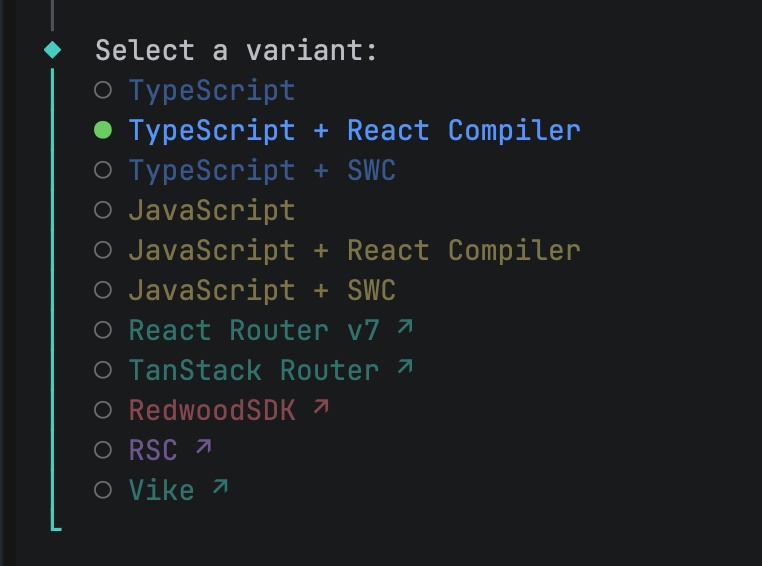
Vite React 선택 옵션
저는 typescript와 react compiler 옵션을 선택했습니다.
다음 옵션에서 Use rolldown-vite (Experimental) 질문이 나오는데
실험적 기능이므로 No를 선택했습니다.
다음으로 Tailwind CSS를 설치하고 설정합니다. 다음 명령어를 실행하세요:
pnpm add tailwindcss @tailwindcss/vitevite.config.ts 파일을 열고 다음과 같이 Tailwind CSS 플러그인을 추가합니다.
import { defineConfig } from "vite";
import react from "@vitejs/plugin-react";
import tailwindcss from "@tailwindcss/vite";

// https://vite.dev/config/
export default defineConfig({
  plugins: [
    tailwindcss(), // tailwindcss 플러그인 추가
    react({
      babel: {
        // vite-react 초기 설치시 옵션에따라 다를 수 있음
        plugins: [["babel-plugin-react-compiler"]],
      },
    }),
  ],
});
저는
App.css파일을 사용하지 않기에src/App.css파일을 삭제했습니다.
index.css 파일을 열고 내용을 전체 삭제 후 다음과 같이 Tailwind CSS 지시문을 추가합니다.
@import "tailwindcss";기본 Tailwind CSS 설정이 완료되었습니다.
다음으로 tanstack router를 설치합니다. 다음 명령어를 실행하세요:
pnpm add @tanstack/react-router
pnpm add -D @tanstack/router-plugin
vite.config.ts 파일을 열고 다음과 같이 tanstack router 플러그인을 추가합니다.
import tailwindcss from "@tailwindcss/vite";
import tanstackRouter from "@tanstack/router-plugin/vite";
import react from "@vitejs/plugin-react";
import { defineConfig } from "vite";

// https://vite.dev/config/
export default defineConfig({
  plugins: [
    tailwindcss(),
    tanstackRouter({
      target: "react",
      autoCodeSplitting: true,
    }),
    react({
      babel: {
        plugins: [["babel-plugin-react-compiler"]],
      },
    }),
  ],
});
다음은 src/main.tsx 파일을 열고 tanstack router를 설정하는 예시입니다.
import { createRouter, RouterProvider } from "@tanstack/react-router";
import { StrictMode } from "react";
import ReactDOM from "react-dom/client";
import "./index.css"; // Tailwind CSS 가져오기

// 생성된 경로 트리 가져오기
import { routeTree } from "./routeTree.gen";

// 새 라우터 인스턴스 만들기
const router = createRouter({ routeTree });

// 유형 안전성을 위해 라우터 인스턴스 등록
declare module "@tanstack/react-router" {
  interface Register {
    router: typeof router;
  }
}

// Render the app
const rootElement = document.getElementById("root")!;
if (!rootElement.innerHTML) {
  const root = ReactDOM.createRoot(rootElement);
  root.render(
    <StrictMode>
      <RouterProvider router={router} />
    </StrictMode>,
  );
}
이제 기본적인 tanstack router 설정이 완료되었습니다.
마지막으로 개발 서버를 실행하여 설정이 올바르게 되었는지 확인합니다. 다음 명령어를 실행하세요:
pnpm dev개발 서버를 실행한 후 브라우저에서 http://localhost:5173에 접속하여 기본 React 애플리케이션이 표시되는지 확인하세요.
이제 Vite, tanstack router, Tailwind CSS가 통합된 React 프로젝트가 성공적으로 설정되었습니다.
tanstack router의 라우팅에 상세한 내용은 다음 링크의
문서를 참고하세요.
 Recode Log